This is an introduction to io.Connect’s core capabilities and building blocks. It covers the integrated user experience, interoperability model, and runtime architecture of the platform.
What’s io.Connect?
io.Connect is an enterprise class integration platform that turns disparate applications into a cohesive, integrated experience. In essence, it acts as a unifying “connective tissue” for your software ecosystem, allowing separate apps to communicate in real time and appear to the end-user as parts of a single logical application. The platform significantly improves workflows by delivering the right information at the right time across applications, eliminating context-switching inefficiencies. You can link legacy, third-party, and modern applications without having to rewrite them not only via API-s but also visually on a screen.
Core Capabilities:
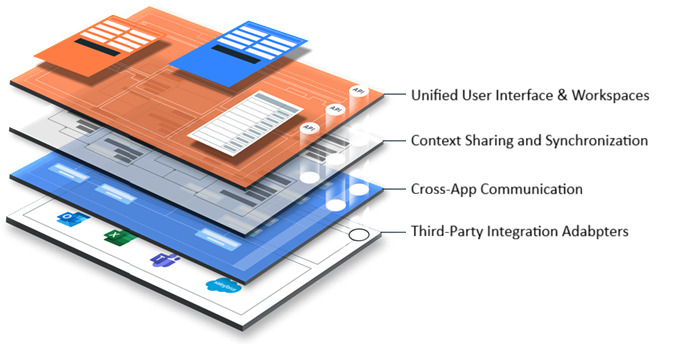
Unified User Interface & Workspaces: Instead of a clutter of separate windows, io.Connect offers Workspaces – configurable windows that can contain multiple application components arranged as tabs or tiles. Multiple apps can “work together within a unified user interface with the look and feel of a single app” . Users can group related tools on screen, save these Workspaces, and restore them later. Workspaces are typically assembled to meet the need for a set of applications to perform a specific task or function. The result is a unified desktop experience where, e.g, a salesperson’s workspace might include a customer list, details panel, and analytics charts all in one view, even if they are separate apps under the hood.
Context Sharing and Synchronization: The platform provides mechanisms (Shared Contexts and Channels) to keep applications in sync with each other’s context (state). “App Context Synchronization” is a hallmark benefit: when a user makes a selection or changes data in one app, other subscribed apps automatically update to reflect that context. This means no more redundant data entry or toggling between apps to manually coordinate information.
Cross-App Communication: io.Connect enables applications to share data and invoke each other’s functions seamlessly. For example, a CRM system and a trading system can exchange a client ID or trigger actions in one another instantly, instead of relying on manual user actions to bridge them. By integrating applications at the client layer users get instant feedback without the need for complex backend integrations and need to refresh UI to access updates. This real-time connectivity is the backbone of improved workflows.
io.Connect introduces the concept of Intents, which enable cross-app workflows in a decoupled manner. An “Intent” represents a high-level intention (e.g. “View Client Profile” or “Initiate Trade”) and any app that can fulfil that intent can register to handle it. When one app raises an intent, the platform can automatically launch or activate the appropriate app to handle it, or present the user with options if multiple apps are capable. This empowers end-users to transition between functional steps across apps with a click, constructing workflows that span multiple tools. It effectively delivers on the idea of “intuitive paths from one function to the next, to deliver business outcomes quickly”. At runtime intents are discoverable, this enables late binding, such that an application can raise an intent and the platform will resolve which application is available to fulfil the intent, where multiple applications are available the user can be asked to choose which application they wish to use. There’s also built-in support for standards like FDC3 (Financial Desktop Connectivity and Collaboration), meaning it can readily interoperate in financial industry contexts with other FDC3-compliant systems.
Extensibility and Third-Party Integration: The platform is built to integrate existing software assets rather than force starting from scratch. It provides Application Adapters for popular software like Microsoft Office (Excel, Outlook, Word and PowerPoint), Bloomberg Terminal, Salesforce, etc., to easily bring them into the unified environment. For example, there are adapters that allow you to embed and control Excel or feed data to it as part of a workflow, or to have Outlook share context with other apps. This means you can include these apps in your integrated workflows protecting your existing investments. The platform is also technology-agnostic – it supports web apps ( JavaScript/TypeScript, Angular, React, etc.), .NET, Java, C++, and even VB/A or Delphi apps via it’s APIs. This broad compatibility ensures virtually any application in your enterprise can be brought into the fold.
Enterprise Control and Monitoring: io.Connect includes enterprise-ready features such as a central configuration and app directory (often managed by io.Manager), permissioning (who sees/uses what apps or data), and monitoring of usage and performance via io.Insights . Administrators can remotely configure the platform, deploy new apps or updates, and even observe user engagement.
Unified Notification Centre where all alerts from integrated apps are collected, prioritized, and enriched with actions that can set context, load workspaces or launch applications
Search API and global search that can query data across apps/backends and presents combined results in one UI. This not only streamlines the user experience, but also reduces development effort for building search capabilities in individual custom apps.
FDC3 and OTEL
io.Connect adheres to open standards where possible (like FDC3 for intents and context data), ensuring that the architecture can plug into a larger ecosystem. If your organization or vendors already support FDC3, io.Connect’s FDC3 support will allow those apps to work with io.Connect apps out-of-the-box. This is an architectural advantage as it reduces vendor lock-in and eases integration of third-party fintech apps common in financial services.
io.Connect publishes OpenTelemetry (OTEL) data, while io.Insights provides an OTEL Collector and Store which can be used with OTEL compliant BI applications such a Grafana.
Execution Model
io.Connect allows modular deployment and development. Different teams can build or onboard apps independently, and io.Connect simply brings them together at runtime. This aligns well with modern micro-frontend or SOA approaches, where each component can be updated or replaced without affecting the others, as long as they speak the common “interop language” (intents, contexts, or methods). In practice, this means faster delivery and iteration: teams can build new functionalities one piece at a time and deploy them continuously, knowing they will seamlessly integrate via io.Connect . The platform also supports side-by-side versioning (you can run different versions of an app for different users if needed, and rollback easily), providing robust DevOps control.
The Desktop Client is the user-side runtime component of io.Connect Desktop. It is an Electron-based app that provides APIs for App Management, Window Management, and Data Sharing Between Apps. Through these APIs, it can load the list of app definitions available to the current user, manage app lifecycle, host web apps in desktop windows, support advanced window management such as Workspaces and Layouts, and enable data-sharing mechanisms such as Shared Contexts, Channels, and Interop. The io.Connect APIs are available for web apps through JavaScript/TypeScript and for desktop apps through .NET, Java, and COM/VBA. The Desktop Client is highly customizable, and many features can be enabled, disabled, or reconfigured.
Web apps can participate in io.Connect Desktop through the @interopio/desktop JavaScript library. The library can be auto-injected and optionally auto-initialized by the platform, or referenced directly by the application
App definitions are not simply “hosted by the Desktop Client.” io.Connect Desktop loads app definitions from configured app stores, which can be local stores, remote REST stores, or io.Manager stores. In standard deployment models, app definitions can be served remotely and connected to entitlement systems, allowing different users to receive different apps or different versions of the same app.
Inter-app communication is handled by the io.Connect Gateway, which is the communication layer described in the next section.

The Gateway, WebSockets & App Roles
The Gateway: The central message router and bus. Every interop-enabled app connects on startup over a WebSocket. All messages pass through it.
WebSocket: A persistent, full-duplex TCP connection. Unlike HTTP, it stays open so the Gateway can push data at any time.
Server / Provider: Registers methods, streams, or contexts. Capabilities are advertised to all peers.
Client / Consumer: Discovers and invokes methods, or subscribes to streams and contexts.
Every interop-enabled app is a Gateway client. Within the Interop API, the same app can be both a server and a client simultaneously.
Message flow:
SDK init → WebSocket → Gateway → Peers

Runtime message routing:

The architecture allows you to integrate without invasive changes and avoid unneeded modifications to existing apps just to make them work together. Instead, through a joint integration layer, it delivers immediate UX improvements and sets the stage for composable applications where new workflows can be created by orchestrating existing components. In situations where monolithic legacy applications need to be decomposed into multiple separate micro frontends io.Connect provides a way to avoid a big bang approach.
Read next:
io.Connect Architecture